
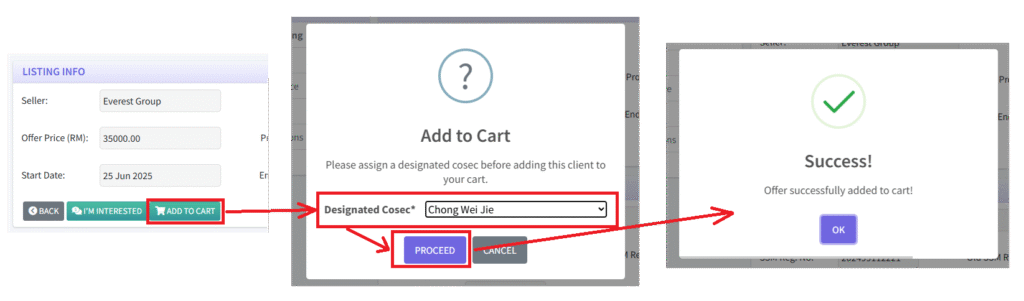
1. To purchase multiple clients at the same time, the prospective buyer firm first selects a listing from the EzOpt marketplace. This will then display the listing information and client information. Then, click the “ADD TO CART” button, then select a designated cosec.
This step is required because once payment is completed and the selling firm transfers the client, the designated Cosec will be responsible for handling the onboarding process.
Finally, click “PROCEED” to add the client to the EzOpt cart.
2. Repeat this step for as many clients as desired.
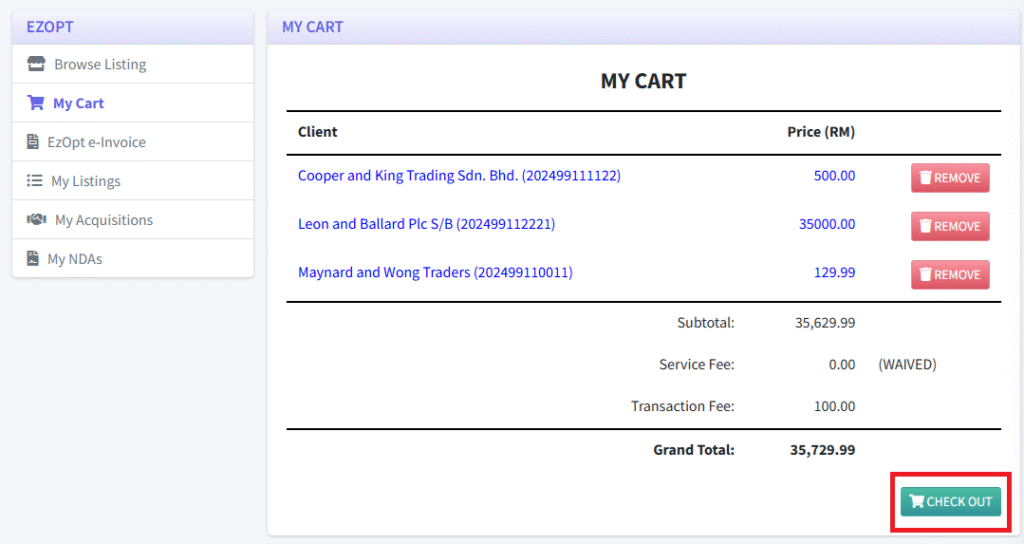
3. To view all clients current in the EzOpt cart, click the “My Cart” tab. Once everything is confirmed correct, click “CHECK OUT”.
4. In the CHECK OUT page, the firm can make a final check to ensure they have assigned the correct designated Cosec for each client. Once everything is confirmed correct, click “PLACE ORDER”.

5. After that, each listing will be marked as “IN PROCESS”. At the same time, an invoice and payment link is generated. An email is sent to the buying firm to continue payment.
6. After successful payment, each listing is marked as “PENDING”, after which the transfer process can continue.