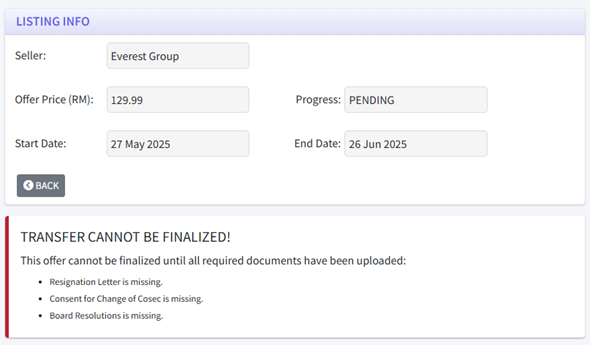
The transfer process for a client purchased via the EzOpt marketplace begins once payment has successfully been made (and the listing is marked as “PENDING”).
1. On the buyer firm’s side, they must wait for the selling firm to upload to them the required documents first.
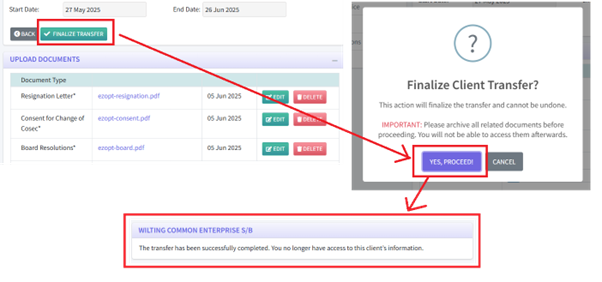
2. On the selling firm’s side, they will upload the required files.

3. Once the selling firm uploads all the required documents, they can finalise the transfer by clicking the “FINALIZE TRANSFER” button. A popup will appear to let them confirm the action, by clicking “YES, PROCEED!”. After this, the client is transferred to the buying firm.
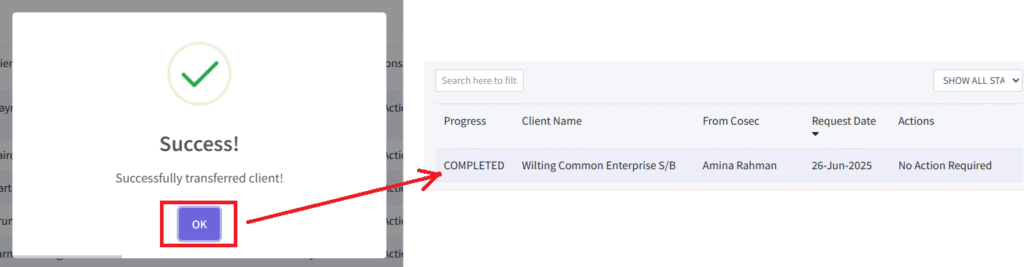
4. At this point, both the buying firm and designated Cosec will be notified of the successful transfer, after which the client onboarding process can continue.
5. Next, the designated Cosec will onboard the transferred client by navigating to the Clients index and clicking “TRANSFER REQUESTS”.

6. Then, the Cosec accepts the client transfer and conducts the onboarding. Once it is complete, the Client will now be displayed in the Cosec’s client index.