
1. Login as Director, go to the top right menu and select “VIEW SUBSCRIPTION”.

2. Before subscribing to E-Invoice, make sure to complete “Director Info” and “Billing Address”.
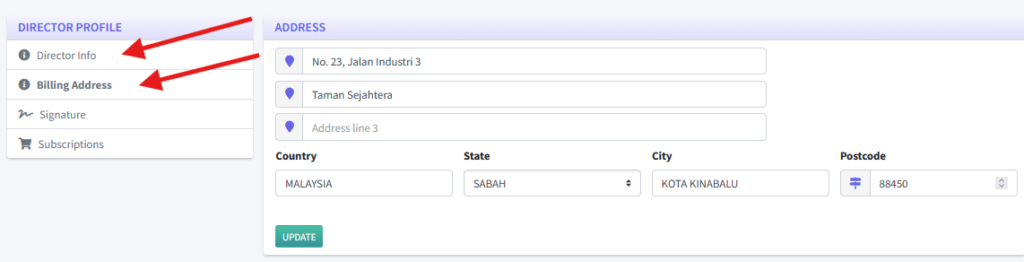
3. After completing the details above, go to the “Subscriptions” submenu, and click the “New Subscription” button.

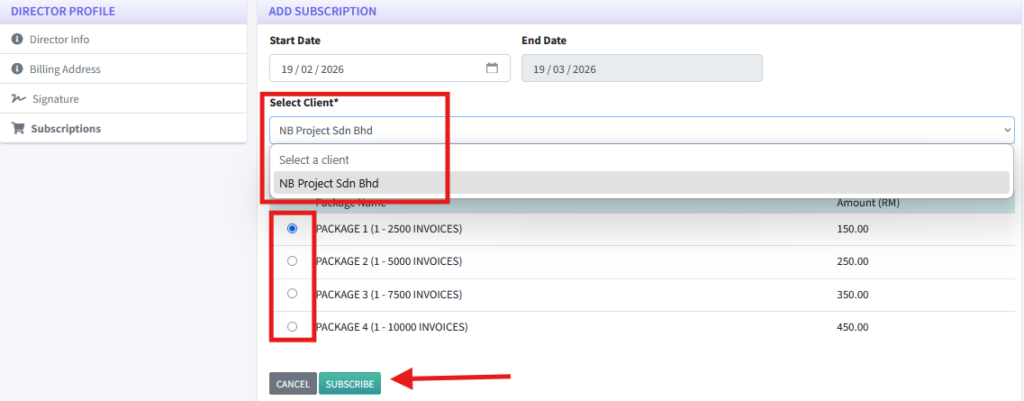
4. Select the client that wants to use the E-Invoice service and select the desired E-Invoice package. Then, click “Subscribe”.
5. Directors have to choose to use the existing email of the clients or new email. This is for creating a new Invoice Admin account to manage the E-Invoice.

6. An email with the payment link and invoice will be sent to the director’s email. First-Time subscription to E-Invoice will include the Integration Fee and free 1 Month subscription. Click on the “Pay Now” button to proceed direct payment.

7. After complete payment, click on the “HOW TO ADD INTERMEDIARY” and follow the instructions given. Users will be able to use e-Invoice within 1-2 days.

8. At the same time, an email to reset password for Invoice Admin is sent to the invoice admin email for login. Reset the password as usual.

9. Invoice Admin should be able to login after resetting the password. Go to the top right menu and select “SETTINGS”.

10. Fill in the settings form and click “SAVE CHANGES” to save.
