
1. After clicking on the button to add a new client, a form will display. Please fill-up the following details. Unless otherwise stated all fields are compulsory.
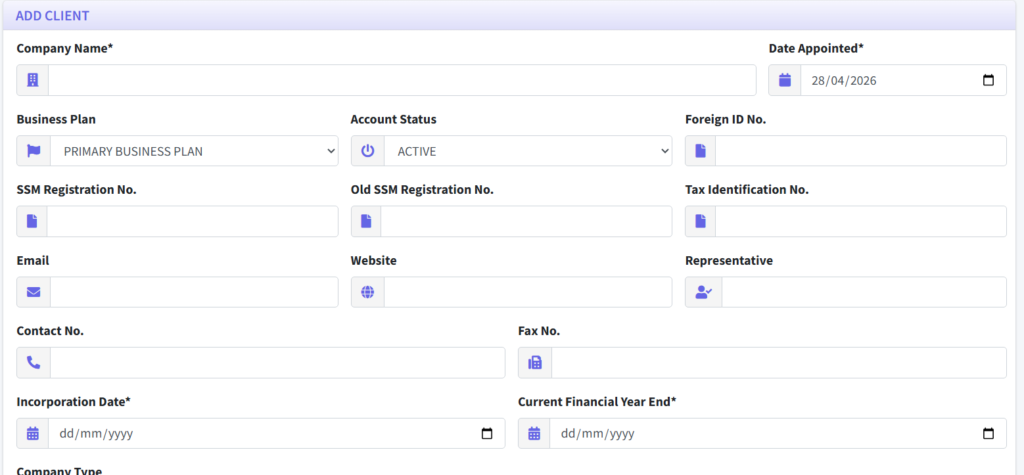
- Company Name: Name of company/client
- Date Appointed: Date when the Cosec was appointed
- Business Plan: Select the primary business plan for this company.
- Membership: The membership plan as set by the Firm.
- Account Status: Set the client as Active/Inactive.
- Foreign ID. No.: Foreign ID number. This field is optional.
- SSM Registration No.: SSM Registration number here.
- Old SSM Registration No.: Company’s old SSM registration number.
- Tax Identification No.: Enter the company’s tax identification number.
- Email.: Company email
- Website: The company’s website address.
- Representative: The designated representative for the company.
- Contact No: Company contact number
- Fax No.: Company fax number.
- Incorporation Date: Date company was incorporated according to SSM records.
- Current Financial Year End: Enter incoming financial year end. A new task will be created based on the date entered here.
- Company Type: Select the legal classification or type of the company from the drop-down menu.
- Nature: Provide a detailed description of the company’s business activities.
- MSIC Code: Type in the code or description, a drop-down will appear underneath the field. Click to choose the code. You can choose up to a maximum of 3 codes. The link to refer to the MSIC code is provided, click to view it. It will open in another window.
- Registered Address: Enter the company’s registered address. Also select if this address is where Register of Members or Financial Records are kept. The firm address can also be used by clicking on the button “PREFILL WITH FIRMS ADDRESS”. However this is only available if the Cosec’s Firm completed their address within their profile.
- Business Address: Enter the company’s main business address, including country, state, city, and postcode. Check the “SAME AS REGISTERED ADDRESS” box if the location is identical to the registered address to automatically copy the details over. This section also includes secondary fields for the business location’s specific contact number, fax number, email, and website.
2. After all fields have been filled, click on “ADD” button to submit.
3. Upon successful addition, the page will refresh back to the client listing.